Data Flow
Interactive architecture diagrams — server layers, request lifecycle, data layer, page hierarchy resolution, and the build pipeline.
Blog-Doc architecture
The mental model of Blog-Doc’s architecture.
Blog-Doc architecture
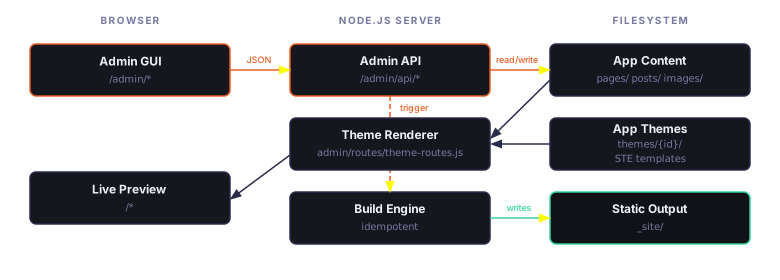
What to remeber: Everything is managed through the Admin GUI
(/admin/*), except theme creation, which is a developer task. A user selects a
theme, writes content, and generates a static _site/ folder that can be
deployed to any static hosting service or a plain VPS. That's how easy Blog-Doc is!
Diagram 1 — Server architecture
The four-layer structure: Admin GUI routes (/admin/*), Admin API nested router
(/admin/api/*), Admin Bar middleware (app.use()), and Live theme
routes (/*), all sharing the same LiteNode server and filesystem.
buildSearchIndex() runs once at server startup before any routes are
registered.
Server architecture — four-layer overview
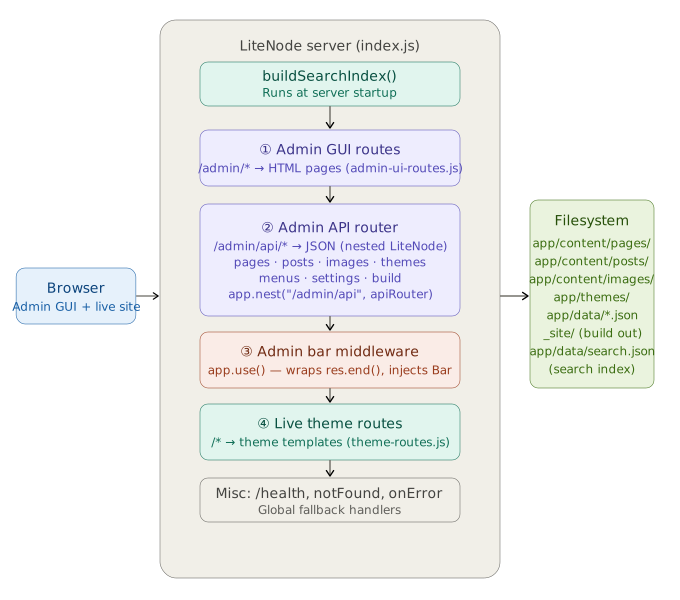
What to look for: Route registration order — Admin GUI first, API second,
Admin Bar middleware third, Live theme last. The admin bar middleware wraps
res.end() globally, so it must be registered after the admin routes (which it
skips) and before the live theme routes (which it injects into). The live theme's
/:pagename catch-all is why order matters: register it too early and it
swallows admin routes.
Diagram 2 — Request lifecycle
Traces an incoming HTTP request from browser through the routing decision tree: admin GUI
match → API match → admin bar middleware (wraps res.end) → live theme route
matching → handlePageByPath / resolvePageHierarchy → STE render →
response. The noTrailingSlash 301 redirect runs as per-route middleware on
every live theme handler.
HTTP request lifecycle and routing decisions
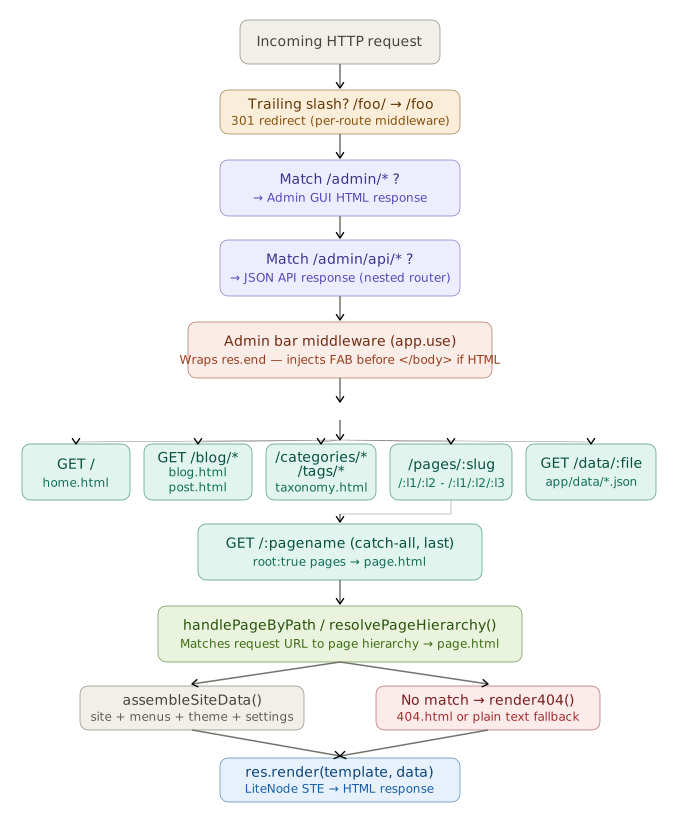
What to look for: The admin bar middleware sits between the API and live
theme layers — it wraps res.end() before the route handler fires, injecting the
FAB only into HTML responses from live theme routes. Note the new route nodes: taxonomy
routes (/categories/*, /tags/*) and the
/data/:file route that serves app/data/*.json to live themes. For
page routes, handlePageByPath is the shared resolver covering
/pages/:slug, /:l1/:l2, and /:l1/:l2/:l3 — all
resolve by matching the computed hierarchy URL.
Diagram 3 — Data layer
Shows data.js, site-data.js, search.js, and
parseRawMarkdown() as a pure-function cluster with no HTTP objects, the
filesystem directories they read/write, and which consumers depend on them
(theme-routes.js, API routers, build.js, index.js).
Data layer — module relationships and filesystem layout
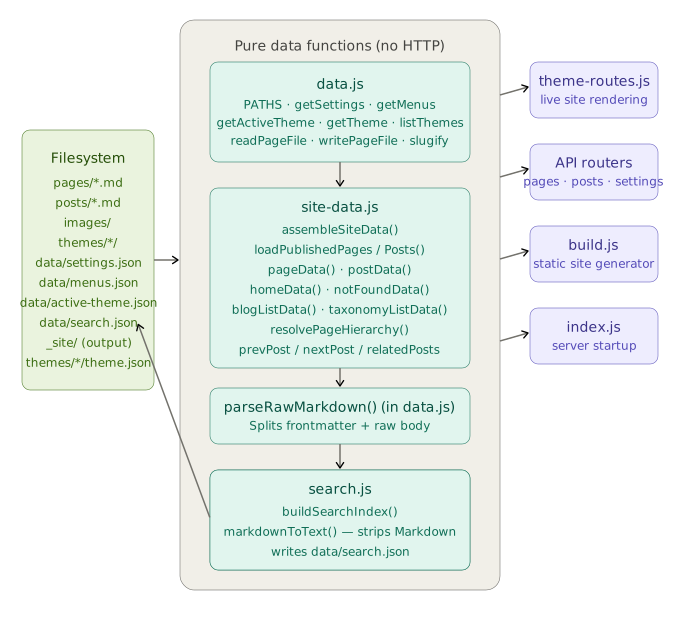
What to look for: site-data.js is the single source of all
template data shapes, consumed by both theme-routes.js (live) and
build.js (static). search.js is a separate module with its own
write path — it produces app/data/search.json and is called both at server
startup (via index.js) and during every build. Nothing in the data layer
imports from LiteNode — it's entirely pure.
Diagram 4 — Page hierarchy resolution
Maps resolvePageHierarchy() — from input slug through the
root: true early-exit, parent-chain walking with a visited-set cycle guard,
guard checks (cycle detection, missing parent, depth > 3), the Option B URL strategy, and
the ancestors array construction used for breadcrumb templates.
resolvePageHierarchy() — page URL and ancestor resolution
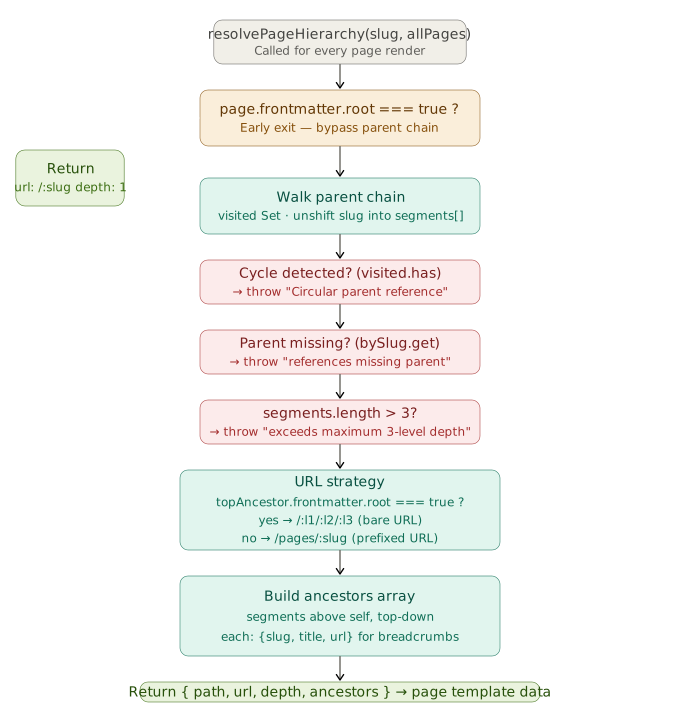
What to look for: The root: true early-exit path (very short —
just returns depth: 1 with a bare /:slug URL, bypassing all
parent-chain logic). The three guard conditions that throw loud errors instead of silently
failing. The Option B URL branch: bare /:l1/:l2/:l3 URLs are only used when the
top ancestor in the chain has root: true — otherwise the page falls back to
/pages/:slug. The ancestors array carries
{slug, title, url} for every page above self, ready for breadcrumb
templates.
Diagram 5 — Build pipeline
All 18 build steps sequentially: config load → template pre-flight → renderer setup →
_site/ wipe → content parse → render pages / posts / blog index / 404 /
taxonomy indexes / home → rewrite static paths → copy assets → generate
sitemap.xml, rss.xml, robots.txt → build and copy
search.json.
Static site build pipeline — all 16 steps
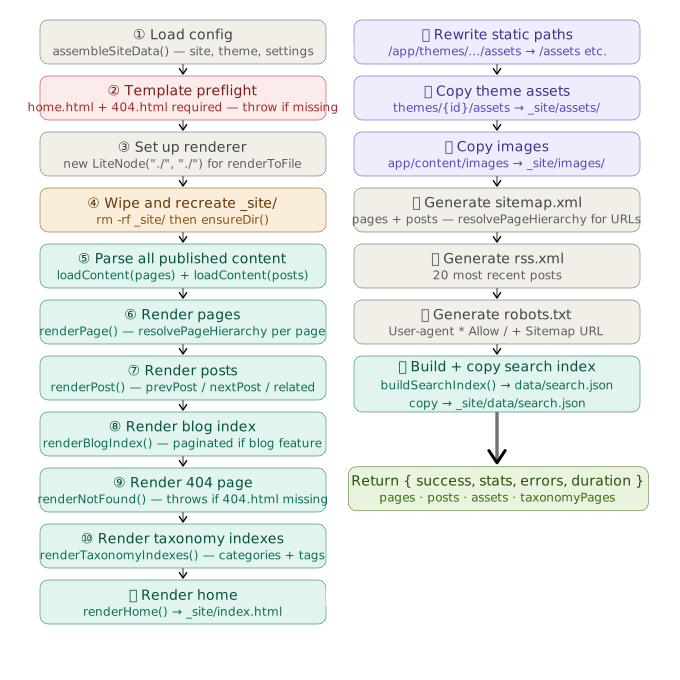
What to look for: Steps ① and ② — pre-flight runs
before the wipe. If the theme is missing required templates (home.html
or 404.html), _site/ is never touched. Step ⑩ is the new taxonomy
index renderer (categories + tags pages) — only runs when taxonomy.html exists
in the active theme. Step ⑫ (rewriteStaticPaths) runs immediately after all
HTML is rendered but before any assets are copied — it rewrites live-server paths in every
.html file so theme authors never need
isGenerateStatic conditionals. Step ⑱ is the new search index step:
buildSearchIndex() writes app/data/search.json, then it is copied
to _site/data/search.json for static deployment.